
Invoices are mostly a sum of a invoice lines (see How an invoice is calculated), with various information for each of them, and invoice lines are usually(*) an aggregation of rated transactions, that are the rated items ready to be invoiced.
(*) Invoice lines are usually an aggregation of rated transactions
This is the case for all invoices generated automatically (billing run, generate invoice), but when you create a manual invoice, you directly create invoice lines, without using the catalog and rating.
For more on invoice line generation, check Invoice line and invoice line generation
Invoice lines on Portal
Invoice line are visible directly on the Invoice page.
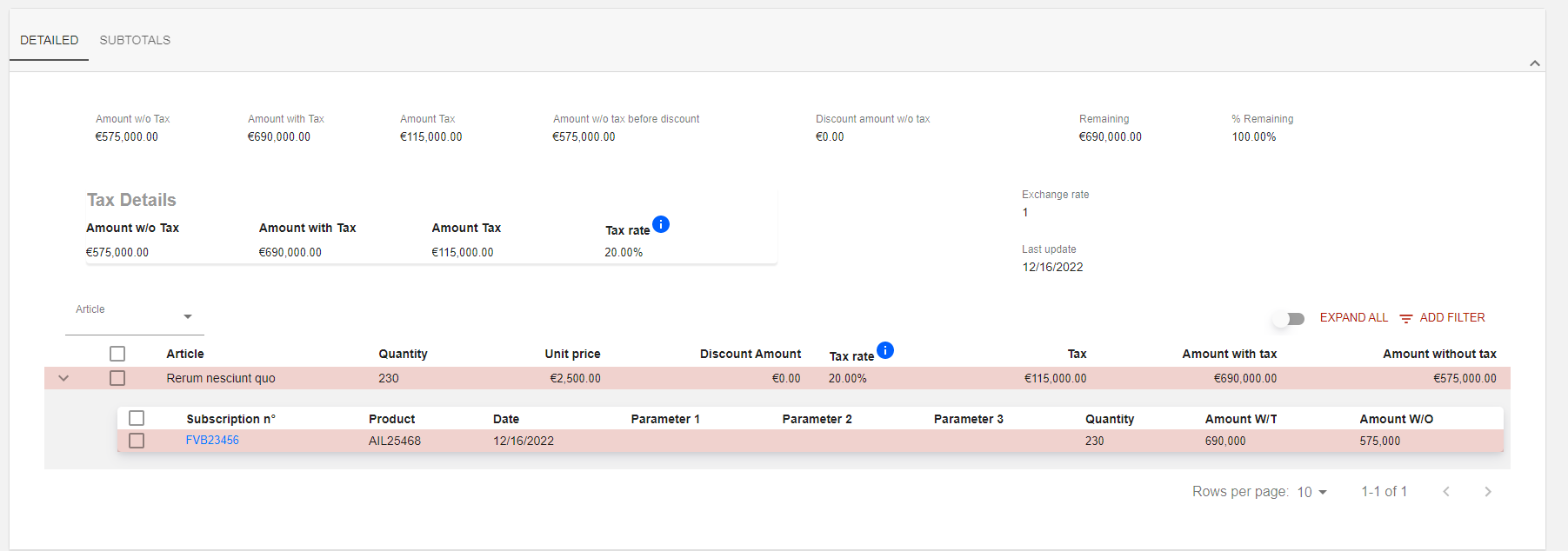
On the example above the invoice line is visible on the second section of the invoice page, in the DETAILED tab.
You can also unfold an invoice line to list rated transactions used to generate it.
It is also possible to Expand all invoice lines and add filters (:filter: button).
Adding invoice lines in the new portal
From 18.1.0 onwards, you can add lines to an invoice directly on its page in the new portal, for example to complete an invoice you have just created manually. In the new portal, the invoice lines are listed in the Details section of the General information tab. By default, this list shows the article, label, quantity, unit price, tax rate and amount without tax of each line.
To add an invoice line:
-
Open the invoice and click Edit. The invoice switches to edit mode, and the Edit button is replaced by Save modifications.
-
In the Details section, click Add invoice line. This button is available only in edit mode, and never on a validated invoice.
-
In the Add article window, which shows the code, sub-category, description, tax class, accounting code, unit price and invoice type of each article, click the article of the new line.
-
The line takes the description and unit price of the article. Enter the quantity, and change the unit price if needed.
-
Click Save modifications. The invoice leaves edit mode, and the button becomes Edit again.
The tax of a line is determined by its article. In the new portal, you can change the quantity and unit price of a line, but not its description, article or tax.
An invoice needs at least one invoice line before you can validate it: until then, the Validate button stays disabled.