
Collection Plan Management – Actions and Behavior
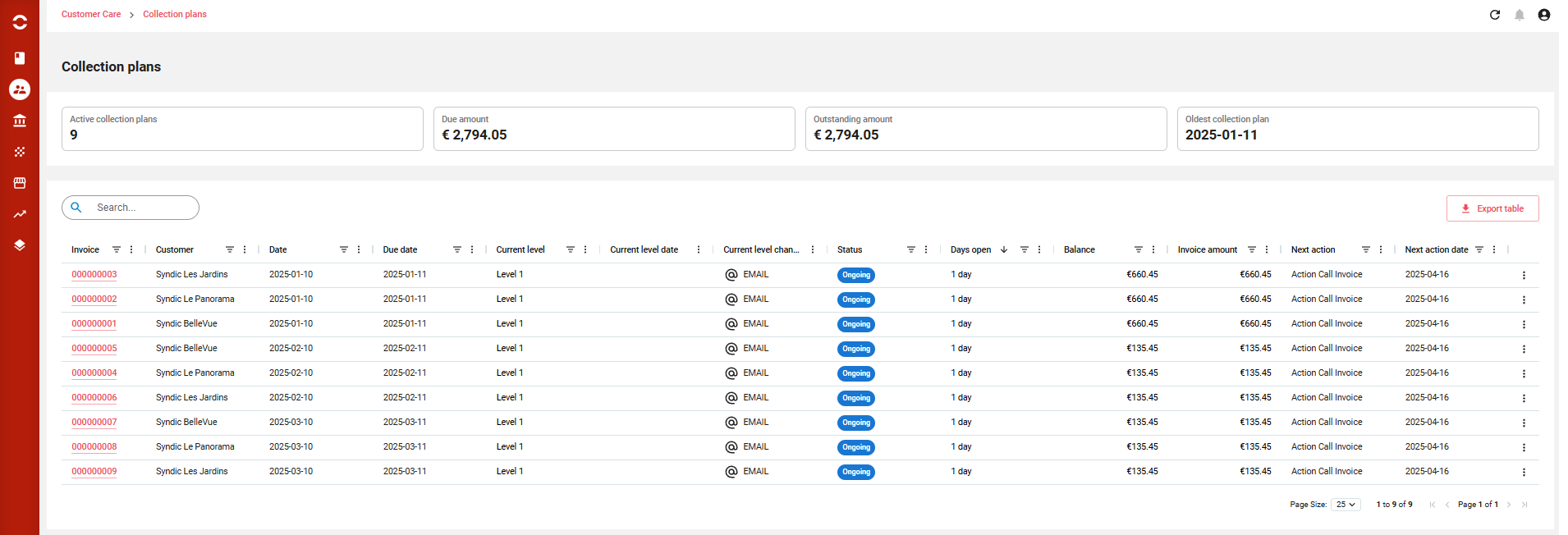
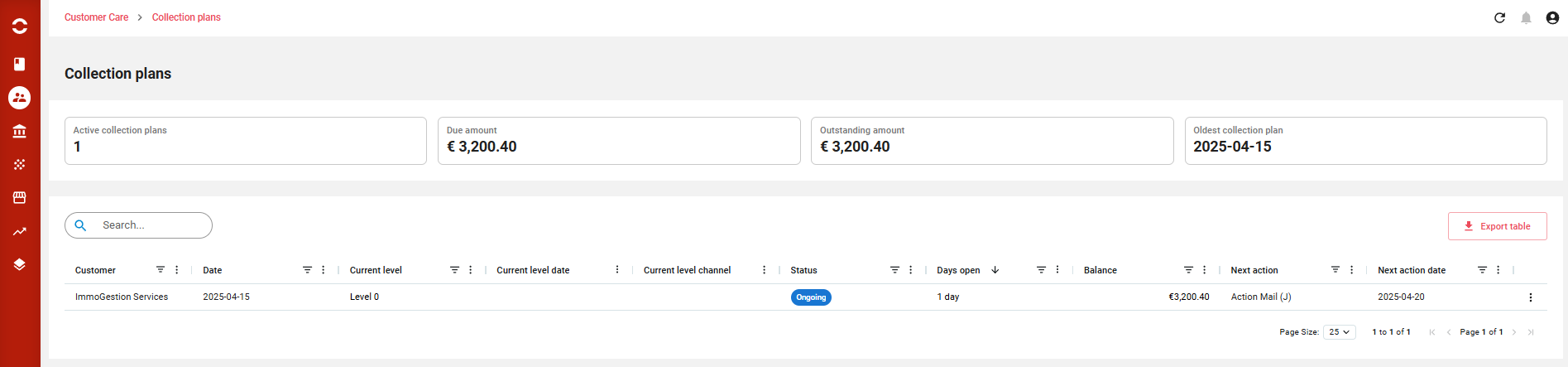
The Collection Plan Listing page serves as the main dashboard for managing all active and historical dunning processes in Opencell. Depending on the selected dunning mode (Invoice-based or Customer-based), this page offers full visibility and control over the lifecycle of each Collection Plan (CP).
Overview of Collection Plan Listing
✅Modes Supported
-
Invoice Mode: Each CP is linked to a specific invoice.
-
Customer Mode: Each CP is linked to a customer account and includes all eligible unpaid invoices.
📋 What the listing includes:
-
Status of each CP:
-
ONGOING,RECOVERED,UNRECOVERED,PAUSED,STOPPED -
Each status is color-coded for easy identification.
-
-
Level & Action Tracking:
-
Last executed level and action with execution date.
-
Next level and next action with scheduled execution date.
-
-
Links for context:
-
In Invoice Mode, you can access the related invoice directly.
-
In Customer Mode, the associated customer account code is shown.
-
-
User-Friendly UI Features:
-
Columns can be filtered, sorted, shown/hidden, and reordered directly via mouse interactions.
-
⚙️ Actions Available (via 3-dot menu for each CP)
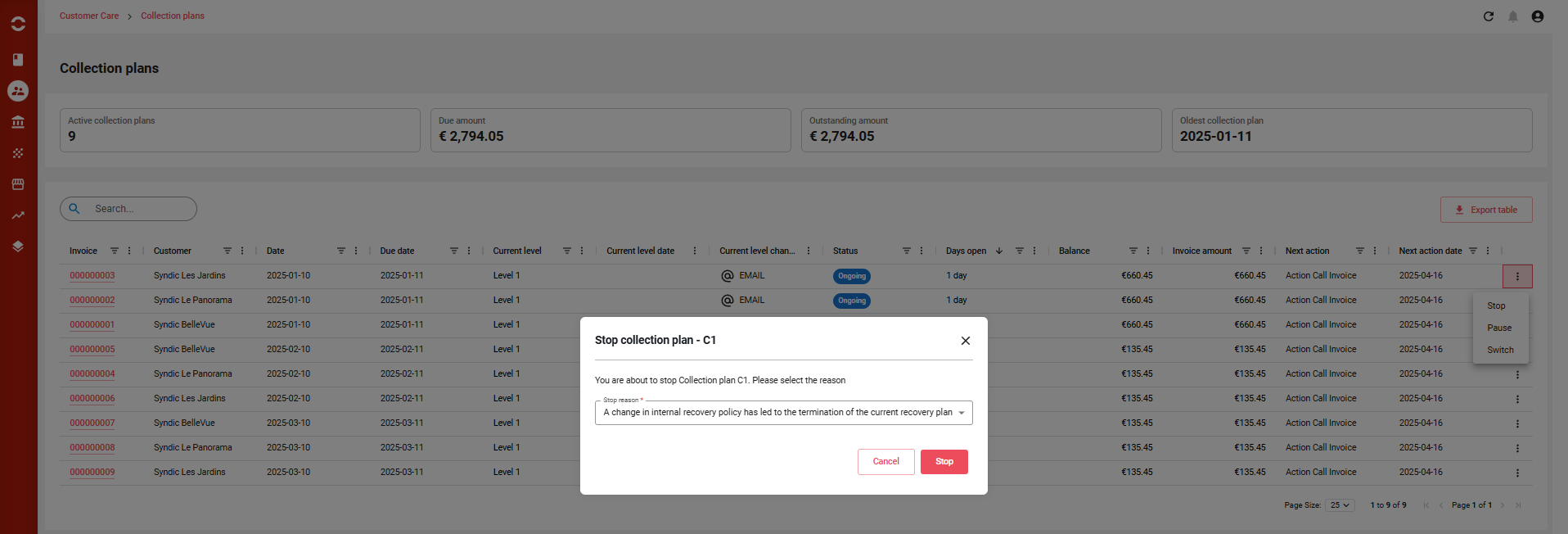
You can interact with each collection plan directly from the list view using the action menu. The following actions are supported:
⛔ STOP Collection Plan
Purpose: Permanently terminate a collection plan.
-
All non-executed levels and actions are marked as IGNORED.
-
The CP is moved to a final status:
STOPPED. -
No further actions or status changes are allowed on this CP.
-
Typical use cases:
-
Manual override by the dunning manager.
-
Customer issue resolved outside of system workflow.
-
🟠 Once stopped, the CP cannot be resumed or edited.
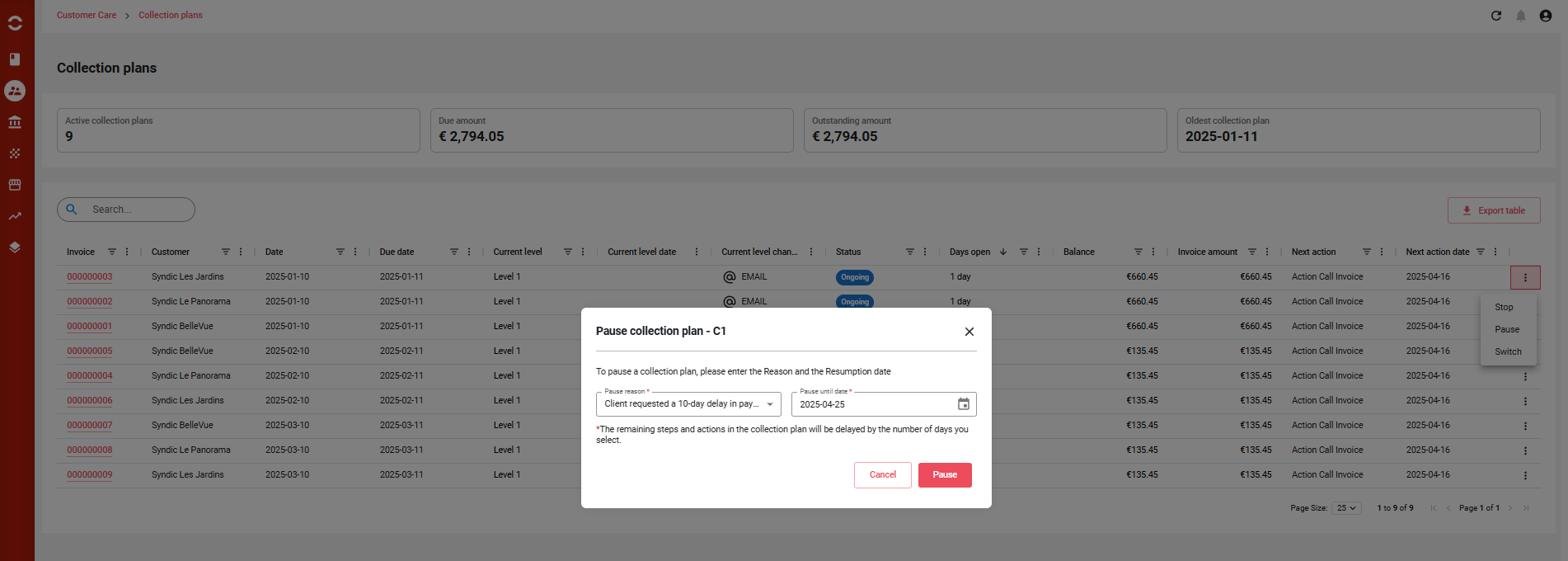
⏸️ PAUSE Collection Plan
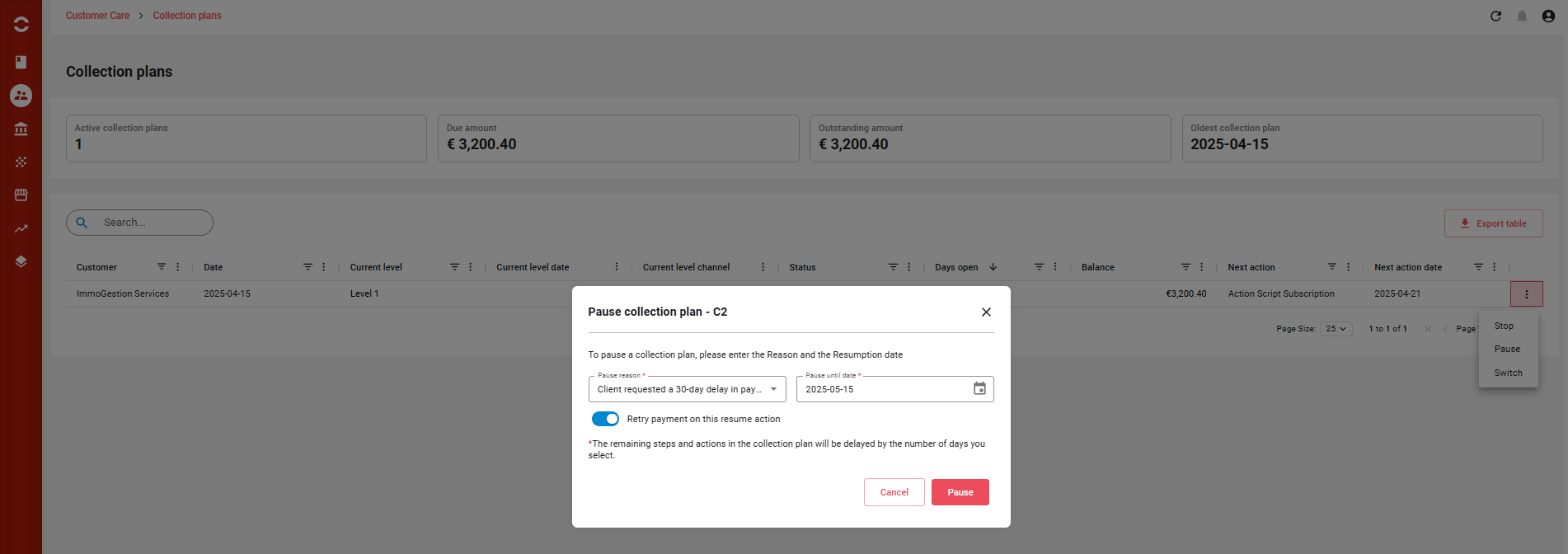
Purpose: Temporarily suspend the execution of a Collection Plan (CP), for example in sensitive customer cases or to delay further escalation.
🛠️ How It Works
-
The user selects a resume date.
-
All remaining levels and actions are automatically postponed by the number of days in the pause period.
-
The CP status becomes PAUSED, and while paused:
-
❌ No automatic or manual actions can be executed.
-
⏳ The CP timeline is effectively frozen.
-
This allows the business to pause dunning activities without disrupting the intended level sequencing.
💳 Retry Payment on Resume (New Behavior)
If the customer account has a direct debit or card payment method configured, the system can automatically attempt a retry payment as soon as the CP is resumed. This helps:
-
Avoid restarting dunning for customers who may have simply had temporary payment issues.
-
Increase collection efficiency by leveraging saved payment methods.
📌 This behavior is optional and can be enabled via popup.
🔄 Execution resumes via user action or the
ResumeDunningCollectionPlan_Job.
▶️ RESUME Collection Plan
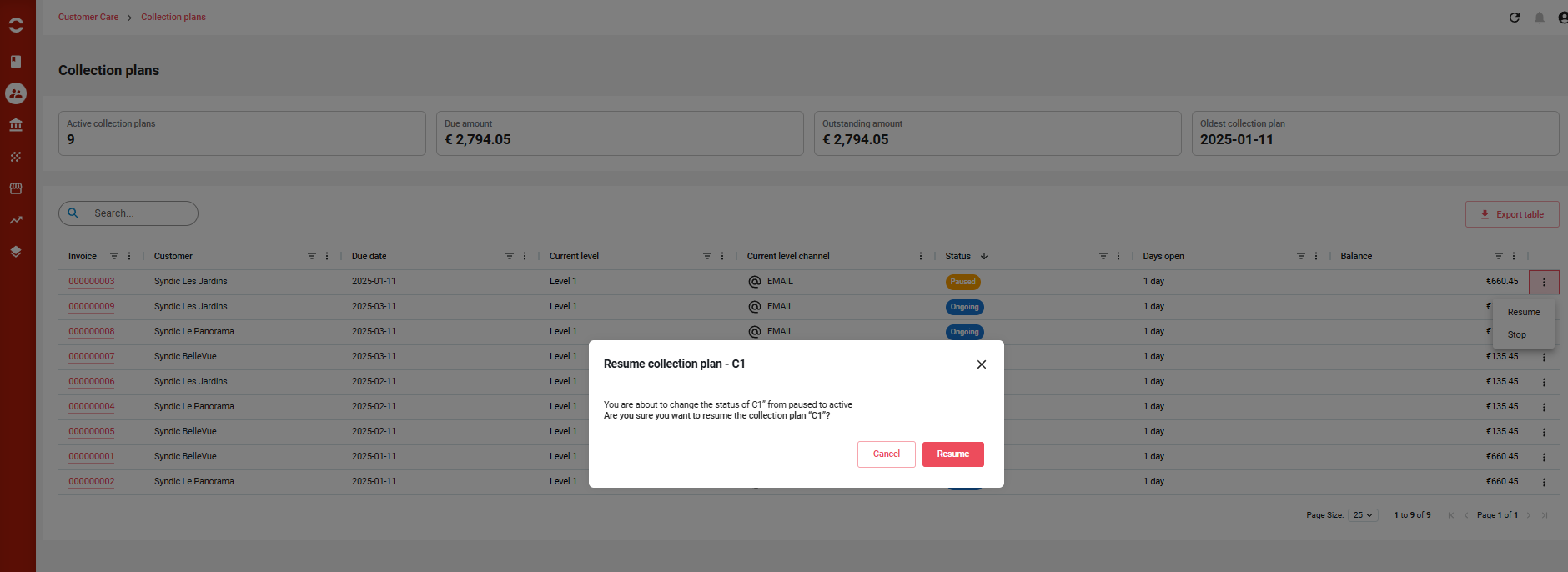
Purpose: Restart a paused collection plan.
-
Execution dates of all pending levels and actions are recalculated from the resume date.
-
If resumed before the scheduled resume date:
-
Execution starts from current date.
-
All remaining levels/actions are shifted accordingly.
-
-
The CP re-enters
ONGOINGstatus.
✅ Ideal for re-engaging with the customer once the pause reason has been resolved.
🔁 SWITCH Collection Plan
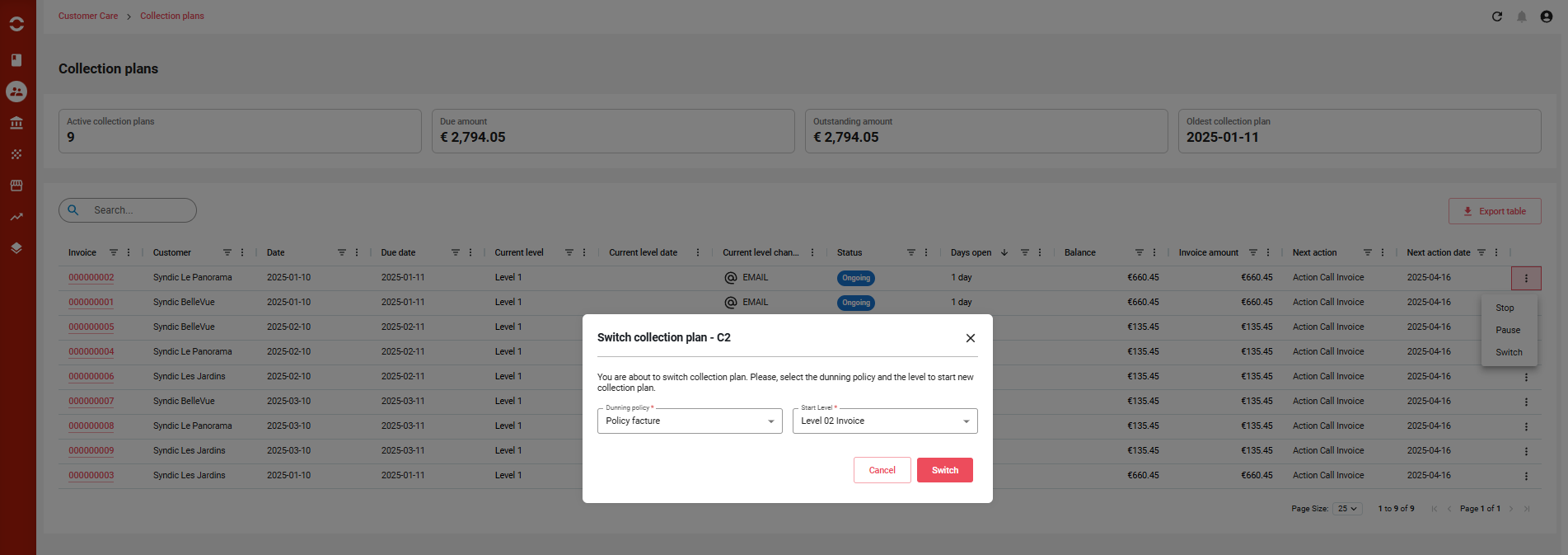
Purpose: Replace the current policy with a different dunning policy.
-
The user selects:
-
A new dunning policy.
-
A start level within the new policy.
-
-
Once confirmed:
-
The current CP is stopped, and its remaining levels/actions are ignored.
-
A new CP is created using the selected policy and level.
-
-
This allows adapting the dunning strategy mid-course:
-
Escalating to a more aggressive policy.
-
Switching to a softer approach for VIP customers.
-
⚙️ This action provides strategic flexibility without losing historical traceability.
✅ Summary Table of Actions
|
Action |
Description |
Resulting Status |
Notes |
|---|---|---|---|
|
STOP |
Ends the CP permanently and ignores all remaining steps |
STOPPED (final) |
Cannot be resumed |
|
PAUSE |
Freezes the CP temporarily until a chosen resume date |
PAUSED |
All pending steps postponed by the pause duration |
|
RESUME |
Reactivates a paused CP and recalculates all remaining execution dates |
ONGOING |
Can be triggered manually or by scheduled job |
|
SWITCH |
Ends current CP and starts a new one using a different policy and start step |
OLD = STOPPED / NEW = ONGOING |
Keeps full audit history & improves policy agility |
📤 Exporting Collection Plan Listings
Users can easily export the full Collection Plan Listing using the "Export table" button available on the page.
-
The export will generate an Excel file containing all currently displayed columns in the table.
-
The exported file is automatically downloaded to the configured "Exported Dunning Target Directory".
-
This feature is useful for:
-
Reporting and analysis.
-
Sharing dunning status with finance or customer teams.
-
Archiving active or historical collection plans.
-
✅ Make sure the columns you want are visible before exporting, as only displayed columns are included.