
On this page we are going to present the Consumer tab in the Customer 360° view, as well as explain you the consumer role. Let’s dive in!
Consumers
A consumer in Opencell actually refers to the User Account level in the Opencell account hierarchy (check out https://opencellsoft.atlassian.net/l/cp/0Bf4s0A6 and User Account to learn all about).
So essentially, the consumer will be the individual or organization that will actually use (beneficiate) the subscription in Opencell. This explains why the consumer is a key aspect when using our solution.
Creating a consumer
Consumers are created and listed directly on the Consumer tab. As for other list views in Opencell, you will be able to use a search bar which will allow you to search seamlessly on:
-
Code
-
Name
-
Internal reference
-
Registration n°
-
VAT n°
-
Parent consumer (code and name)
A :filter: button gives you access to the following
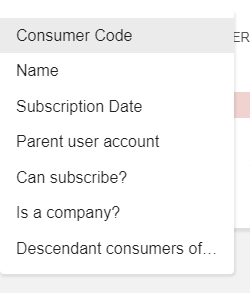
Finally; to create the consumer, hit the NEW CONSUMER button at the top right corner of the list view.
As for a new Customer, you will have to define to create an Individual or a Company Consumer, and fill mandatory fields at minimum.
You will note that the Can subscribe? toggle is set as TRUE by default. If you set change this setting, then you will not be able to link this Consumer to any subscription.
Do not forget to create a Consumer for your Customers, else you will have an error, as a Consumer is mandatory to any Subscription in Opencell